
Horizon Blue
Horizon Blue Cross Blue ShieldMedical
4.71.13K Reviews
- Version
- 2.11.1
- Installs
- 100.00K
- Age Rating
- Everyone
Screenshots
Our Review of Horizon Blue
 Analysis by Appyee
I found Horizon Blue most useful as a practical companion for people who already have a Horizon Blue Cross Blue Shield health plan and want their plan information close at hand. It is not trying to replace a doctor, a pharmacy, or an emergency service. Its value is more ordinary and, in my view, more important: it reduces the amount of searching and paperwork involved in handling routine health-plan tasks.
Developed by Horizon Blue Cross Blue Shield, this free medical app focuses on access to health-plan information rather than general wellness tracking. That distinction matters. If you are looking for workout programs, symptom analysis, medication reminders, or a broad health journal, this is not the kind of app I would choose. If you are a member who regularly needs to check plan details while away from home, its focused approach makes much more sense.
Where Horizon Blue earns its place on my phone
I find Horizon Blue earns a place on my phone when I treat it as a preparation tool, not just something to open after a question comes up. I’d use a quiet moment to get familiar with the account, then make a short note of what I still need clarified before an appointment. That small routine helps me distinguish information I can check myself from questions better handled through a direct conversation.
A focused tool for members, not a general health app
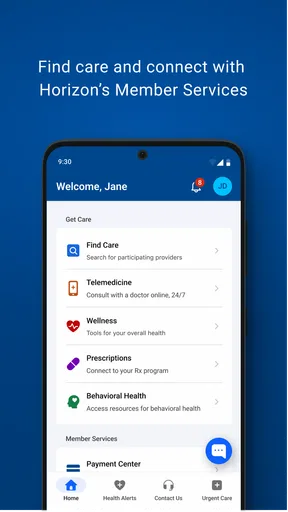
My first impression is that Horizon Blue makes the most sense when viewed as a digital doorway to your insurance account. The store summary describes it as a way to access health-plan information, and that narrow purpose is also what gives the app its clearest identity. Instead of combining unrelated health features, it concentrates on the information members are likely to need when arranging or discussing care.
That focus can be especially helpful when you are dealing with a medical office, reviewing your coverage before an appointment, or trying to make sense of a plan-related question outside normal routines. A phone is usually already in your hand at those moments, so having a dedicated route to your plan information is more convenient than digging through old documents or trying to remember which web page to use.
I also appreciate that the app is aimed at everyday access rather than making health insurance feel like a specialist task. People often understand their medical needs better than they understand the details of their plan. A mobile interface cannot remove every complication, but it can make the first step less intimidating. For a member who wants a more immediate way to review plan information, that is a meaningful benefit.
A realistic appointment-day scenario
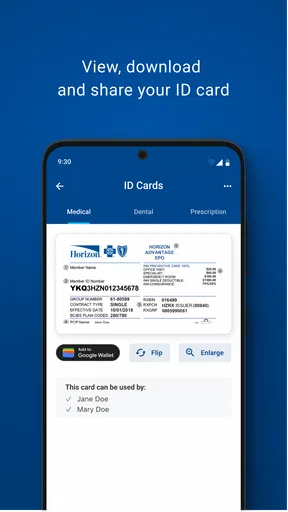
Imagine that I am sitting in a clinic waiting room and the receptionist asks for information connected to my coverage. I may have my phone, but not a folder of insurance papers. In that situation, Horizon Blue is more useful than a general search engine because it is designed around the member relationship rather than around broad medical content.
The same applies before an appointment. I can use the app as part of a small preparation routine: open it before leaving, review the plan information I expect to discuss, and keep the phone available if a question comes up. That does not guarantee that every issue will be settled inside the app, but it can make the conversation with the office more organized.
A less obvious advantage is that this workflow can help separate two questions that people often mix together: “What medical care do I need?” and “How does my health plan handle this care?” Horizon Blue is suited to the second question. Keeping that boundary clear prevents me from treating an insurance app as though it were medical advice.
Why the reception matters
The app holds an average rating of 4.7 from around 10 thousand ratings, with roughly 1.1 thousand written reviews. It has also passed the 100 thousand install mark. Those figures do not prove that every member will have a smooth experience, but they do suggest that the app has found a useful role for a substantial group of people.
I would interpret that reception carefully. Insurance apps are often judged during moments when users are already under pressure, so a tool that makes plan information easier to reach can feel disproportionately valuable. At the same time, ratings can reflect a wide range of devices, account situations, and expectations. Someone who wants a complete medical-management platform may judge it very differently from someone who simply wants a convenient plan-information tool.
Small habits that make it more useful
My strongest practical recommendation is to use Horizon Blue before you urgently need it. Opening an app for the first time in a waiting room is a poor test of any account-based service. I would install it at home, complete the initial setup when I have time, and make sure I understand where the information I commonly need is located.
A second useful habit is to treat the app as one part of an information system, not as the only place where important details exist. For a planned appointment, I would keep relevant questions in a note on my phone and use Horizon Blue to support the plan-related part of the conversation. This avoids the common mistake of expecting an insurance application to organize every medical detail as well.
Finally, I would check the information I am viewing rather than assuming that a screen automatically answers the exact question I have. “Is this covered?” can depend on the service, provider, location, and circumstances. An app can improve access to plan information, but careful reading and a direct conversation with the appropriate health-plan or medical-office contact may still be necessary for a complicated decision.
The main limitation: convenience does not remove insurance complexity
My biggest reservation is not about the idea of the app; it is about the limits of what a mobile plan-information tool can realistically simplify. Health coverage questions can involve terminology and conditions that are difficult even when the relevant information is easy to open. A clean route to your account is helpful, but it does not automatically turn every coverage question into a simple answer.
This is where expectations matter. I would not rely on Horizon Blue alone when a treatment decision is urgent, when I am experiencing serious symptoms, or when I need professional medical guidance. The app belongs in the administrative side of healthcare. It should not become a substitute for emergency services, a clinician, or a pharmacist.
There is also a practical trade-off between a dedicated app and using the organization’s regular website or contacting support directly. Some people prefer a browser because they do not want another application installed. Others may find a phone conversation more reassuring when a question involves several conditions or unusual circumstances. Horizon Blue is the better fit when quick mobile access is the priority; a different channel may be better when explanation and back-and-forth matter more than speed.
Who should use it, and who should skip it?
I would recommend Horizon Blue first to current Horizon Blue Cross Blue Shield members who use a phone as their main way of managing daily tasks. It is particularly suitable for people who attend appointments away from home, keep fewer paper documents, or want plan information available while speaking with a medical office.
It can also help family members who assist with healthcare administration, provided they are using it within the appropriate account and access arrangements. The useful point here is not that the app solves every family-care problem, but that a mobile plan-information tool can make routine coordination less dependent on carrying paperwork.
I would be more cautious about recommending it to someone who does not have a Horizon Blue plan. The app’s purpose is closely tied to that health-plan relationship, so it is not a general-purpose insurance comparison tool. Downloading it simply to browse broad medical information would miss the reason it exists.
I would also steer away from it if my main goal were health tracking. Someone seeking exercise records, nutrition planning, symptom notes, or medication management should look for an app built specifically around those jobs. Horizon Blue is more specialized, and that specialization is a strength only when it matches the task.
How it compares with the usual alternatives
The most obvious alternative is a mobile browser. A website can be flexible and may be preferable for people who dislike installing apps, especially when they use a computer for most administrative tasks. The dedicated app has a more direct feel for phone-first use, though, because it places the health-plan relationship in a space that is easier to reach during an appointment or while traveling.
Another alternative is printed plan material. Paper is still useful as a backup, particularly when a phone battery is low or when I want to mark a page for later. Its weakness is that it can become outdated, get misplaced, or fail to answer a question that arises unexpectedly. Horizon Blue is more convenient for immediate access, while paper can remain valuable for reference and backup.
Calling the health-plan support team is a different kind of alternative rather than a direct competitor. A call may be slower, but it can be better for nuanced questions that require clarification. I see the app as the first stop for checking information and preparing the question, not necessarily the final stop for every complicated case.
General medical apps are also not interchangeable with this one. They may help users record symptoms or learn about conditions, but they do not serve the same administrative purpose. Comparing them directly would be like comparing a medical notebook with an insurance card: both may be useful, but they solve different problems.
Compatibility, cost, and everyday practicality
Horizon Blue is free, carries an Everyone content rating, and supports devices running Android 7.0 or later. That makes it approachable for many Android users, including people who do not replace their phone frequently. I would still check the device’s available storage and operating-system compatibility before installing, especially on an older phone.
The app was released on September 5, 2018, and its current version is 2.11.1. I see that history as a sign that this is an established product rather than a brand-new experiment. It also makes updates worth paying attention to: account-based applications need to keep working as operating systems and security expectations change.
Because it handles access to health-plan information, I would use sensible phone habits around it. I would keep the device protected with its normal screen lock, avoid leaving the account open on a shared phone, and sign out or secure access when appropriate. These are not reasons to avoid the app; they are simple precautions whenever personal health and insurance information is involved.
My final view after weighing the trade-offs
Horizon Blue succeeds when I judge it by the job it appears designed to do: give Horizon Blue Cross Blue Shield members a convenient mobile route to their health-plan information. Its strongest quality is not breadth. It is the reduction of friction during ordinary administrative moments, such as preparing for an appointment, responding to a question from a medical office, or checking plan details while away from home.
Its limitation is equally clear. Easy access is not the same as complete explanation, and the app should not be mistaken for medical advice or a replacement for direct support when a coverage issue is complicated. People who want a broad health-management suite will probably be happier with another type of application, while people without the relevant plan relationship have little reason to install it.
For the right audience, I think it is worth keeping available. The free price, Everyone rating, established release history, and strong user reception all support that recommendation, but the deciding factor is personal fit. If you already manage your Horizon Blue plan from your phone, Horizon Blue is a sensible convenience tool rather than an unnecessary extra. I would recommend setting it up calmly before an appointment or urgent administrative moment, using it to find and review plan information, and switching to a clinician or support representative whenever the question goes beyond what an app should answer.
In short, Horizon Blue is best understood as a focused medical-plan companion. I would recommend it to members who value quick access and prefer digital organization, with the honest reminder that healthcare administration still sometimes needs human explanation. That balance is why I see it as useful: not because it promises to manage everything, but because it handles one important part of the healthcare experience in a more convenient place.
Verdict
Strengths of Horizon Blue
- Clean interface makes checking plan details quick and easy.
- Secure access helps protect personal health insurance information.
- Useful member tools can reduce the need for phone support.
- Digital access makes benefits information available while traveling.
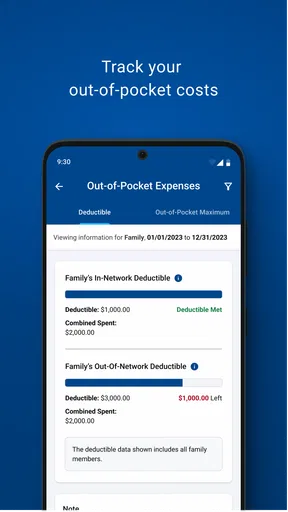
- Helpful for organizing claims, coverage, and provider-related details.
Limitations of Horizon Blue
- Some features may require an eligible Horizon Blue membership.
- Account setup can be inconvenient if member details are unavailable.
- Certain services may vary by plan, location, or insurance coverage.
- App usefulness depends on accurate and up-to-date account information.
- Support options may not replace speaking directly with a representative.
Similar Picks in This Category
View All
WebMD: Symptom Checker
WebMD, LLC4.1

Microphone Amplifier
DOSA Apps4.2

Anatomy Learning - 3D Anatomy
3D Medical OU4.5

Period Tracker and Calendar
SimpleInnovation4.9

GoodRx: Prescription Coupons
GoodRx4.8

CVS Health
CVS Pharmacy4.5
Frequently Asked Questions
What is Horizon Blue, and what can I use it for?
Horizon Blue is an application designed to give users convenient access to information and services through a mobile device. Depending on the version and region, its main tools may include account access, service management, notifications, and helpful resources. Before downloading, check the official description to confirm that the available features match your needs and location.
Is Horizon Blue available for both Android and iOS devices?
Horizon Blue may be available for Android and iOS, although compatibility can depend on your device model, operating-system version, and country. I recommend downloading it only through Google Play or the Apple App Store and checking the listed requirements first. Older phones may not support every feature, while tablets or unsupported regions may have limited availability.
Does Horizon Blue require an account or personal information?
Some Horizon Blue features may require users to create an account or sign in before they can access personalized services. Registration may involve information such as an email address, phone number, identification details, or service-related data. Review the app’s privacy policy and permission requests carefully, and provide only the information necessary to use the features you actually need.
Is Horizon Blue free to download and use?
The Horizon Blue download may be free, but certain services, transactions, subscriptions, or account-related features could involve separate costs depending on the provider and your location. The app-store listing should show whether it contains in-app purchases or subscription options. Always review pricing, billing terms, and cancellation conditions before confirming any paid service inside the application.
Is Horizon Blue safe and reliable to use?
Horizon Blue should be downloaded from an official app store to reduce the risk of installing a modified or fraudulent version. Before using it, verify the developer name, recent update date, ratings, privacy information, and requested permissions. Avoid sharing passwords or sensitive details through unofficial links, and keep both the application and your device software updated for better security.
